Dawamy — Time Tracking for Freelancers
Track hours, capture proof of work, and invoice clients — all in one workspace built for trust between freelancers and employers.
No credit card required. Free for small teams.
 Dawamy
What is Dawamy?
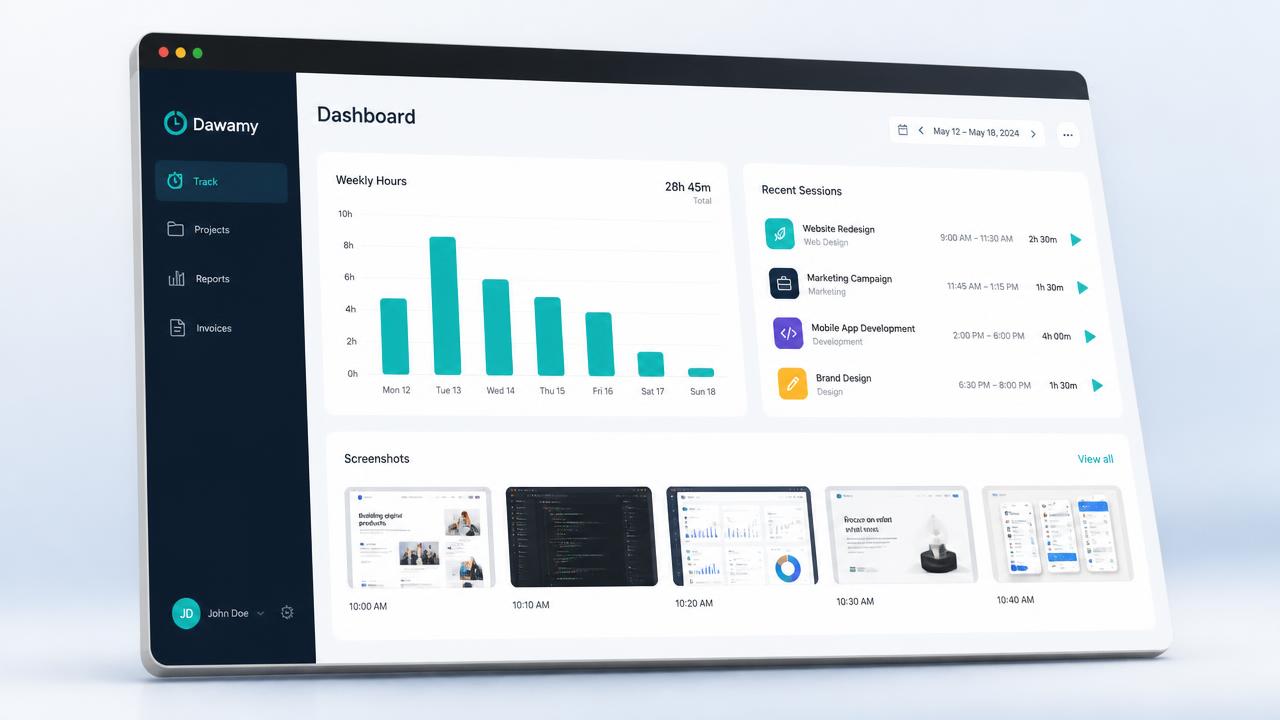
Dawamy is time tracking software for freelancers and remote teams. Freelancers track hours with a simple one-click time tracker, capture proof of work, and invoice clients. Employers create projects and review time. Both sides see the same records, so hours, reports, and payments are always agreed on.
- Freelancers: track time, add notes and screenshots, and invoice from real hours.
- Employers: create projects, invite freelancers, and review and approve hours.
- Together: shared reports and multi-currency invoices generated from tracked work.
Everything you need to track work fairly
A focused toolset for remote teams who want clarity without micromanagement.
Effortless time tracking
Start a timer in one click, track offline, and sync when you reconnect. Manual entries and edits are always logged for transparency.
Transparent, not surveillance
Freelancers see exactly what is recorded. Employers get proof of work without invasive monitoring. Trust is built on shared visibility.
Role-based workspaces
One account, two clean views. Employers manage projects and review hours. Freelancers track time and submit work for approval.
Reports & invoices
Turn tracked hours into shareable reports and multi-currency invoices. Reduce back-and-forth and get paid faster.
Works offline
An offline outbox keeps your sessions safe even without internet. Sync happens automatically when you are back online.
Arabic-market ready
Full right-to-left layout, regional date and currency formatting, and a localized experience for MENA teams.
How Dawamy works
A simple four-step flow that keeps both sides aligned from day one.
Create your workspace
Sign up as an employer or freelancer. Employers invite team members to projects; freelancers accept invites and start tracking.
Track with one click
Choose a project, start the timer, and work. Add optional notes and screenshots so everyone sees what was done.
Review together
Share filtered reports with clients or managers. Both sides see the same data, so approvals are quick and disputes are rare.
Invoice and get paid
Generate invoices from approved hours in your preferred currency. Export PDFs and keep payment records organized.
Trusted by remote teams across MENA
See how employers and freelancers use Dawamy to work better together.
“Dawamy replaced our messy spreadsheets. My freelancers log hours transparently, and I approve reports in minutes instead of days.”
Operations Lead
Remote agency, UAE
“I finally have proof of work I can share with clients. Invoices are generated from actual tracked hours, so payments are never questioned.”
Freelance Designer
Cairo, Egypt
“The offline tracking saved us during a week of unstable internet. Everything synced automatically when the connection returned.”
Project Manager
SaaS startup, Saudi Arabia
Frequently asked questions
Straight answers about how Dawamy tracks time, protects privacy, and gets you paid.
Is Dawamy free to use?
You can start tracking time for free, with no credit card required. Dawamy is free for small teams, so freelancers and small employers can run a full project — tracking, reports, and invoices — before spending anything.
Does Dawamy work offline?
Yes. An offline outbox stores your sessions locally when the connection drops, and everything syncs automatically once you are back online. Nothing you tracked is lost during an outage.
Does Dawamy take screenshots of my screen?
Only if you choose to add them. Screenshots and notes are optional attachments you use to show what was done, not silent background capture. You always see exactly what is recorded before it is shared.
Is Dawamy employee monitoring or surveillance software?
No. Dawamy is built for transparency rather than surveillance. Freelancers see precisely what is recorded, and employers get proof of work without invasive monitoring. Both sides read the same records, so trust comes from shared visibility instead of one-way tracking.
How do freelancers prove the hours they worked to a client?
Every session is a timed record you can enrich with notes and screenshots, and manual entries or edits are always logged. You share a filtered report showing the same data your client sees, so approvals are quick and hour disputes are rare.
Can I invoice clients from my tracked hours?
Yes. Dawamy turns approved hours into invoices in your preferred currency, with multi-currency support and PDF export. Because invoices are generated from real tracked time, the amounts are not open to question.
Can I use Dawamy in Arabic?
Yes. Dawamy is built for the Arabic market with a full right-to-left layout, regional date and currency formatting, and a localized interface. English and Spanish are supported too, and you can switch language at any time.